Tag: agentic workflows

  • Claude Opus 4.7: What Changed, What Didn’t, and Why Some Users Say It “Costs More”

    Claude Opus 4.7: What Changed, What Didn’t, and Why Some Users Say It “Costs More”

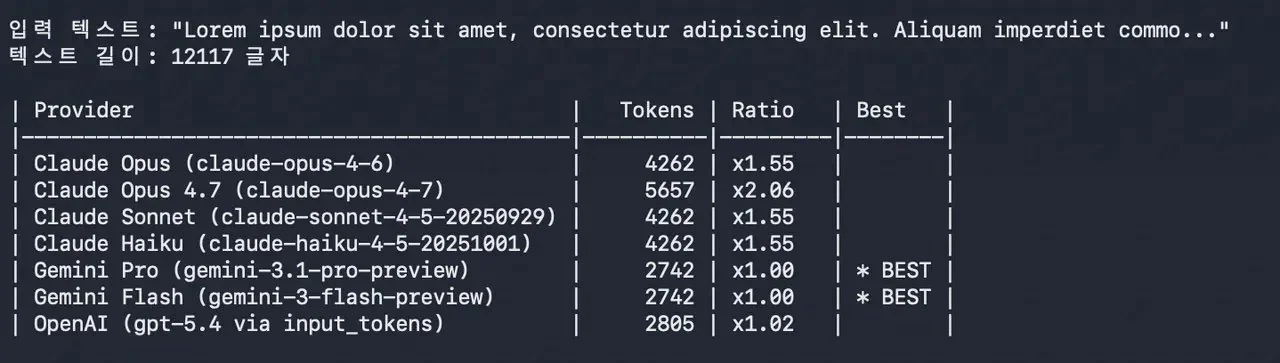
    Anthropic has launched Claude Opus 4.7 and framed it as a straightforward upgrade: better coding, stronger long-running agent work, and improved multi-step reasoning—without a headline price shock.

    But early reactions tell a more nuanced story. Even if list pricing stays similar, the real cost to teams can change because cost isn’t only “$/token.” It’s also:

    • how much context you need to include,
    • how many retries your workflow needs to get a usable answer,
    • and how often an agent loops while it works.

    This is the right lens for builders and operators: treat Opus 4.7 as a throughput + reliability decision, not a vibes upgrade.

    Key takeaways

    • “Same list price” can still feel more expensive if workflows require more context or retries.
    • For agentic use cases, reliability reduces cost; for brittle tasks, it can increase total spend.
    • Evaluate Opus 4.7 with a small benchmark that mirrors your real workload (not general leaderboards).
    • Track cost per successful output (not cost per prompt) to avoid misleading conclusions.

    What Anthropic announced (and what it implies)

    Anthropic’s announcement positions Opus 4.7 as a flagship model optimized for complex work, especially coding and long-running tasks. That typically signals two things:

    1) it should be more consistent across multi-step workflows, and 2) it should reduce the “prompt babysitting” tax.

    If that holds, the model can be cheaper in practice—even if it uses more tokens—because fewer retries and fewer human interventions matter more than token math.

    Why users say the “hidden cost” is real

    The “it costs more” claim generally comes from workflow reality:

    1) Bigger context = bigger bill

    If Opus 4.7 nudges teams toward longer contexts (“include the whole file / the full ticket / the last 50 messages”), usage climbs quickly.

    2) Retries + tool loops compound spend

    Agent workflows (tool calling, browsing, multi-file changes) can run many steps. Small increases in step count can produce meaningful cost changes.

    3) Output quality changes the cost curve

    If Opus 4.7 reduces rework, it’s cheaper. If it’s inconsistent in your niche domain, it becomes more expensive than the headline suggests.

    A practical evaluation checklist (business-first)

    Run a 60-minute evaluation before committing:

    1) Choose 10 real tasks (support answers, code diffs, analysis memos, etc.). 2) For each task, measure:

    3) Compare “cost per successful output” across:

    • tokens in + tokens out,
    • number of retries,
    • time-to-acceptable output,
    • whether humans had to intervene.
    • Opus 4.7 vs your current model,
    • short-context vs long-context variants,
    • agent workflow vs single-shot prompts.

    That tells you whether Opus 4.7 is actually an upgrade for your business.

    What to watch next

    If the early “hidden cost” narrative persists, it will likely converge into a few measurable points:

    • regression on long-context reliability (forcing retries),
    • higher average context length in real workflows,
    • or specific failure modes in coding/agent tasks that weren’t obvious at launch.

    Sources and methodology

    • Anthropic announcement: https://www.anthropic.com/news/claude-opus-4-7
    • Reddit thread (user reports; not independently verified): https://www.reddit.com/r/ClaudeAI/comments/1sn8ovi/opus_47_is_50_more_expensive_with_context/
    • X post referenced in the discussion (treat as a claim, not proof): https://x.com/AiBattle_/status/2044797382697607340

    *Related: Check out our [comprehensive guide to Claude workflows](https://aitrendheadlines.com/free-claude-learning-guides/).*

  • Codex “For Almost Everything”: What OpenAI Shipped and Why the Reaction Is Mixed

    Codex “For Almost Everything”: What OpenAI Shipped and Why the Reaction Is Mixed

    OpenAI’s latest Codex release is not being framed as “a better coding assistant.” The messaging is bigger: Codex is being pushed toward a workspace for multi-step work that can operate across tools—closer to an agent than an IDE plugin.

    That shift explains the mixed reaction. The upside is obvious: fewer handoffs, more automation, and faster iteration. The skepticism is also rational: cross‑app agents introduce new failure modes—permissions, hallucinated actions, and unreliable long chains.

    Key takeaways

    • This is a positioning change: Codex is being sold as an agent workspace, not just autocomplete.
    • The business question is not features—it’s reliability per workflow and cost per successful output.
    • Cross‑app capability raises governance requirements (least privilege, logs, approval gates).
    • Teams should evaluate Codex on a small, repeatable task set before rolling it broadly.

    What OpenAI announced (high signal)

    OpenAI’s announcement describes Codex as expanding into broader workflows—beyond “write code” into operating across a developer’s full task surface. Even without perfect details, the important implication is:

    The product is moving from “assist me” to “run steps for me.”

    That’s a different market category—and a different operational risk profile.

    Why the early reaction is mixed

    1) Trust is the bottleneck

    The more steps an agent runs, the more chances it has to drift. In production environments, a single wrong action can cost more than a week of saved time.

    2) Permissions don’t scale by default

    If Codex needs access to repos, tickets, browsers, and deployment surfaces, you need clear boundaries:

    • what it can read,
    • what it can write,
    • and what always requires human approval.

    3) “Cool demo” ≠ repeatable workflow

    The highest ROI comes from workflows that are:

    • frequent,
    • well-defined,
    • and easy to verify (diffs, logs, deterministic checks).

    How to evaluate Codex like a business tool (not a hype launch)

    Pick 10 tasks you actually do (examples):

    • triage a bug ticket into a reproducible checklist,
    • update a small feature behind a flag,
    • generate a weekly “what changed” report from repo + docs,
    • refactor a module with tests passing.

    For each task, track:

    • time-to-acceptable output,
    • number of retries,
    • human review time,
    • and failure types.

    Then compute cost per successful outcome. That one metric will cut through most launch noise.

    What to do if you want this to show up in the Home page consistently

    If you publish manually in WordPress, the homepage “latest updates” section may not refresh automatically. You can refresh it after publishing by running the site’s homepage refresh script (it regenerates the Home cards from the latest posts).

    Sources and methodology

    • OpenAI announcement (primary source): https://openai.com/index/codex-for-almost-everything/