
Tag: workflow

  • How to Build a Folder‑First Second Brain with AI (Karpathy‑Inspired, Agent‑Ready)

    How to Build a Folder‑First Second Brain with AI (Karpathy‑Inspired, Agent‑Ready)

    Most “second brain” systems fail for one reason: they turn knowledge into an app you babysit.

    The folder‑first approach flips that: your knowledge base is plain text in a simple directory structure, and AI becomes the interface—summarizing, searching, and compiling insights on demand. This idea has been popularized recently in a “Karpathy‑inspired” framework: keep it local, keep it boring, and make the AI do the glue work.

    The upgrade for 2026 is that you can now pair this with an agentic workflow (e.g., Claude Code) so the system maintains itself: ingest → normalize → index → review.

    Key takeaways

    • Your “second brain” can be folders + text files; AI is the UI.
    • The real leverage is a schema file that forces consistency.
    • Agent workflows turn it from “notes” into an operational asset: weekly reports, decision logs, and searchable memory.
    • Local‑first storage reduces risk and lock‑in—but only if you handle backups and sensitive data correctly.

    The 3‑folder architecture (the simplest version that works)

    Create one root folder, then three subfolders:

    1) /inbox/ — raw capture (messy notes, links, transcripts) 2) /wiki/ — cleaned, structured pages (stable knowledge) 3) /projects/ — active work (plans, decisions, deliverables)

    If you can’t decide where something goes, it goes to /inbox/.

    The schema file: the AI’s instruction manual

    Without a schema, AI “summaries” drift into vibes. Your schema makes outputs consistent.

    Create a file like /schema.yml:

    page_template:
      title: ""
      summary: ""
      key_points: []
      definitions: []
      sources: []
      open_questions: []
      last_updated: ""
    rules:
      - "Do not invent sources."
      - "If a claim is uncertain, mark it."
      - "Prefer bullets over long paragraphs."

    How to automate ingestion (agent‑ready workflow)

    Step 1 — Capture into /inbox/ (daily)

    • paste links with 2–3 lines of context (“why I saved this”)
    • drop meeting notes or voice transcripts
    • store short “decision memos”

    Step 2 — Normalize into /wiki/ (3x per week)

    Prompt template:

    Convert this inbox note into a Wiki page using schema.yml. Keep sources as URLs. Mark uncertain claims as “unverified”.

    Step 3 — Compile into a weekly report (weekly)

    Have the agent generate:

    • “What changed this week”
    • “Top 5 insights”
    • “Decisions made”
    • “Open questions”

    Store it as /projects/weekly-review/2026-04-XX.md.

    Where Claude Code fits (and why it matters)

    Claude Code is useful here because it can operate across files:

    • create new pages,
    • rewrite older ones to match schema,
    • and generate weekly reports—without you manually copy/pasting between tools.

    For non‑developers, the safety rule is simple: require a plan + diff review before any bulk rewrite.

    Common failure modes (and fixes)

    • Too much structure early: start with 3 folders; add complexity later.
    • No “why” context: always add 1–2 lines on why the note matters.
    • No sources: your wiki becomes fiction; enforce the sources field.
    • Sensitive data leaks: keep secrets out of /inbox/; use separate secure storage for credentials.

    Sources and methodology

    • Claude Code product overview (agentic, project‑wide changes): https://www.anthropic.com/product/claude-code
    • Add the original “Karpathy” reference link you’re quoting (tweet/blog) to avoid hearsay.

    *Related: Check out our [comprehensive guide to Claude workflows](https://aitrendheadlines.com/free-claude-learning-guides/).*

  • Claude Code for Non-Developers: Why Terminal Workflows Are Getting Easier

    Claude Code for Non-Developers: Why Terminal Workflows Are Getting Easier

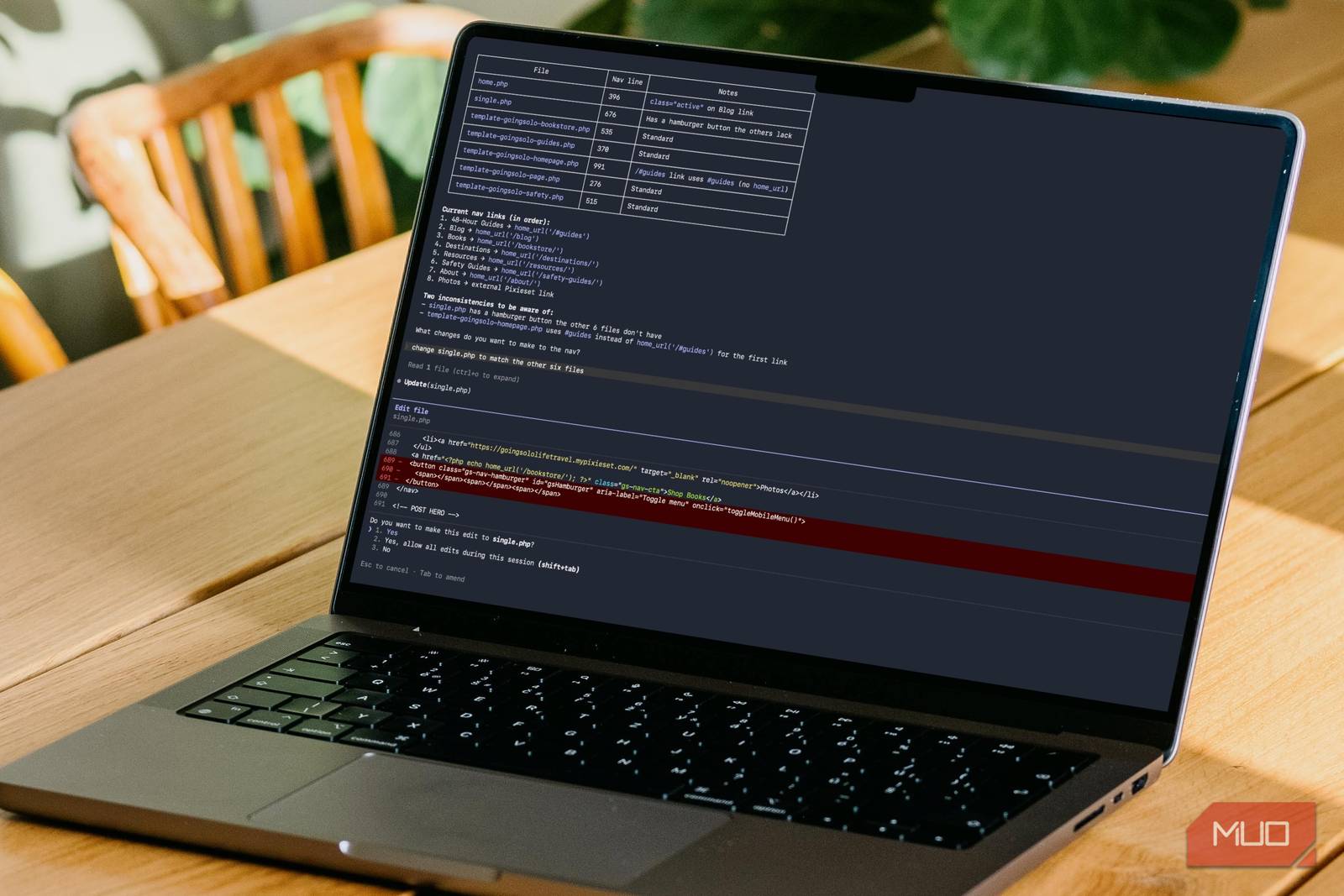
    For most people, the terminal isn’t “hard.” It’s high‑stakes: one wrong command and you worry you’ll break something you don’t know how to fix.

    Claude Code changes that dynamic by acting less like a chatbot and more like an agentic coding system: it can understand a project, propose a plan, and carry out multi‑file changes. That’s powerful for developers—but it’s also the first time non‑developers can realistically benefit from terminal workflows without memorizing syntax.

    The upside is real: faster prototypes, repeatable automations, less tooling friction. The downside is also real: permissions, security, and accountability become the bottleneck.

    Key takeaways

    • Claude Code is designed to operate across an entire project (not just single commands).
    • The best “non‑dev” use is a guardrailed workflow: plan → dry run → review → execute.
    • The biggest failure mode is over‑permissioning (letting an agent run as admin with broad access).
    • Treat “AI + terminal” like “AI + production access”: logs, least privilege, and checkpoints.

    What Claude Code actually is (in plain terms)

    Think of Claude Code as a system that can:

    1) read and understand a codebase or folder, 2) propose a multi‑step plan, and 3) execute changes across files and commands to complete a task.

    That’s a meaningful shift from “copy/paste snippets” to “end‑to‑end task completion.”

    Why this matters for business (not just devs)

    When terminal workflows get easier, three things happen:

    1) More work moves from apps into repeatable scripts (less manual clicking). 2) Ops and analysis become self‑serve for small teams (fewer handoffs). 3) Governance becomes urgent (who is allowed to run what, and when).

    If you’re a founder, analyst, or ops lead, the question is not “can we use it?” It’s:

    • Which workflows should we allow?
    • What data can it touch?
    • How do we review outputs before they cause damage?

    A safe “non‑developer” workflow template

    Use this as a standard operating procedure (SOP):

    1) Start with constraints (not tasks)

    Tell the agent:

    • what it is allowed to read/write (specific folders),
    • what it must never do (delete, reset, publish, deploy),
    • what must be confirmed by a human (network calls, credentials, production changes).

    2) Require a plan before execution

    Ask for:

    • a numbered plan,
    • the exact commands it intends to run,
    • and what files it will change.

    3) Do a dry run / diff review

    For file changes:

    • require a diff,
    • review it like a pull request,
    • then execute.

    4) Log everything

    Keep:

    • a command log,
    • a file‑change log,
    • and a short “what changed / why” note.

    This isn’t bureaucracy—it’s how you prevent “mystery changes” that no one owns.

    The new risks (and how to reduce them)

    • Command injection / unsafe shell usage: constrain tools and require confirmation for destructive commands.
    • Data leakage: do not point the agent at secrets folders, browser profiles, or production credentials.
    • Silent drift: schedule periodic “health checks” (does the workflow still do what you think?).

    Where this pairs perfectly with a “Second Brain”

    If you maintain a folder‑based knowledge base, Claude Code becomes the automation layer that:

    • summarizes new docs into your /inbox/,
    • normalizes notes into consistent schema,
    • and generates weekly “what changed” reports.

    That’s how terminal workflows turn into organizational leverage.

    Sources and methodology

    • Anthropic product page (definition + positioning of Claude Code): https://www.anthropic.com/product/claude-code
    • Claude Code security page (controls / security positioning): https://claude.com/claude-code-security
    • MakeUseOf (non‑dev “terminal fear” framing): https://www.makeuseof.com/i-was-scared-of-the-terminal-until-i-tried-claude-code/

    *Related: Check out our [comprehensive guide to Claude workflows](https://aitrendheadlines.com/free-claude-learning-guides/).*

  • OpenAI Codex 0.119 and 0.120 Bring Workflow Upgrades Developers Will Notice

    OpenAI Codex 0.119 and 0.120 Bring Workflow Upgrades Developers Will Notice

    In the fast-paced world of decentralized prediction markets, the difference between a winning trade and a liquidation often comes down to speed. But speed isn’t just about how fast your bot can sign a transaction; it is about how fast your system can interpret Market Sentiment. This guide explores how AI-driven sentiment analysis is becoming the ultimate edge in platforms like Polymarket.

    1. Why Sentiment Trumps Data in Prediction Markets

    Most traders look at historical data or official reports. However, prediction markets react to expectations. If a viral rumor starts on X (Twitter) regarding a political candidate or a macroeconomic shift, the market will move long before the official data is released. AI agents equipped with Natural Language Processing (NLP) can quantify this “Social Alpha” in real-time.

    2. Building a Sentiment Analysis Pipeline

    To build a sentiment-aware trading bot, you need to connect three layers: a Data Source (Social Media API), a Processor (LLM like Hermes or GPT-4), and an Execution Layer (Polymarket API).

    # Example: Analyzing X sentiment for a Polymarket event
    import textblob
    
    def analyze_sentiment(tweets):
        analysis = []
        for tweet in tweets:
            score = textblob.TextBlob(tweet).sentiment.polarity
            analysis.append(score)
        
        avg_sentiment = sum(analysis) / len(analysis)
        return avg_sentiment
    
    # If average sentiment > 0.5, the crowd is bullish.
    # If average sentiment < -0.2, a panic might be starting.
    

    3. Leveraging "Fear and Greed" in Decentralized Markets

    Advanced traders use AI to detect "Over-Optimism." When sentiment analysis shows an extreme bullish peak, it often signals that the market is overbought, creating an opportunity to bet against the crowd at a discounted price. This is pure game theory in action.

    Read More from AI Trend Headlines:

    *Keep Reading: [How AI is transforming Polymarket trading strategies](https://aitrendheadlines.com/claude-polymarket-wallet-analyzer/).*
  • Claude Code and OpenClaw: Practical Automation Tools for Business Leaders

    Claude Code and OpenClaw: Practical Automation Tools for Business Leaders

    ## Detailed Analysis: Claude Code and OpenClaw: Practical Automation Tools for Business Leaders

    Claude Code and OpenClaw are emerging as key tools for businesses aiming to enhance workflow automation with simplicity and precision.

    In the evolving landscape of business technology, automation tools are becoming indispensable for improving operational efficiency. Claude Code, developed by Anthropic, and OpenClaw are two noteworthy platforms gaining traction among workflow automation teams. Each offers distinct approaches to simplifying complex processes, making them attractive options for executives seeking practical solutions.

    Claude Code is an extension of Anthropic’s Claude AI, designed to facilitate the automation of tasks by translating natural language instructions into executable code. This tool is particularly useful for teams that want to automate repetitive workflows without deep programming expertise. By interpreting user intent expressed in plain language, Claude Code can generate scripts or code snippets that integrate with various business systems, reducing the time and technical barrier traditionally associated with automation projects.

    On the other hand, OpenClaw provides a robust framework focused on automating and orchestrating complex workflows across different applications and platforms. Its strength lies in enabling businesses to connect disparate software tools seamlessly, allowing for streamlined data flows and task management. OpenClaw appeals especially to organizations looking for scalable automation solutions that can adapt to evolving operational needs.

    Both Claude Code and OpenClaw resonate with the growing demand for automation that is both accessible and adaptable. For business leaders, these tools represent opportunities to reduce manual workload, minimize errors, and accelerate process execution. Their adoption can lead to improved responsiveness and agility, crucial factors in competitive markets.

    While Polymarket continues to offer insights through prediction markets, tools like Claude Code and OpenClaw focus on internal business efficiencies, complementing the external intelligence landscape. As automation becomes a strategic priority, understanding and leveraging these platforms can provide executives with practical pathways to enhance productivity and innovation.

    In conclusion, Claude Code and OpenClaw exemplify how automation technology is evolving to meet the needs of modern business teams. By simplifying the creation and management of automated workflows, they help organizations stay efficient and responsive in a fast-paced environment. Business leaders interested in automation should consider these tools as part of their broader technology strategy.

    Related reading: Polymarket Explained for Executives: A Practical Look at Prediction Markets, Claude Code Leak Draws New Attention to Anthropic’s Developer Tools, and REJECT vs. AGELITE: Polymarket Insights and Automation Trends for April 6, 2026.

    *Keep Reading: [How AI is transforming Polymarket trading strategies](https://aitrendheadlines.com/claude-polymarket-wallet-analyzer/).*